

An Automat-PDF tool
Split a PDF into several files
« I need to cut a large PDF into several files »
One file per page, or every N pages, numbered or named from a list.
Windows 10 and 11 · 4.5 MB · no administrator rights

The situation
A batch of letters scanned together, a 200-page PDF to cut every 2 pages.
The solution
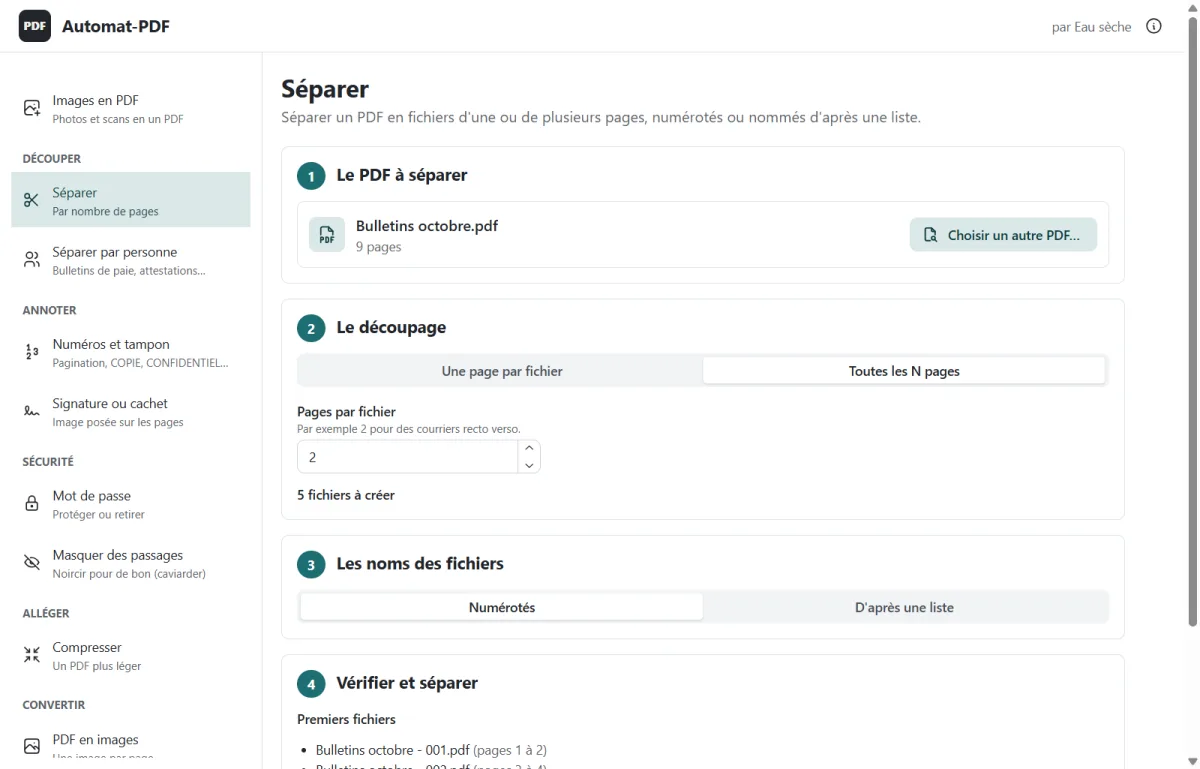
Séparer creates one file per page, or every N pages; the files are numbered, or named from an Excel list.
Step by step
-
The PDF to split.
-
The cutting: one page per file, or every N pages.
-
The file names: numbered, or from a list.
-
Check the first names, then Séparer… (Split…).
Screenshots of version 0.2.0, taken in the real application (in French); the names, amounts and addresses they show are fictitious.

Automat-PDF does this on your computer
Free, no subscription, no advertising, no Internet needed. Windows 10 and 11.
Other Automat-PDF tools
- Send each employee their own payslip by email Tool: Séparer par personne (Split by person)
- Compress a PDF for WhatsApp or email Tool: Compresser (Compress)
- Merge several PDFs into one Tool: Fusionner (Merge)
- Reorder, rotate or delete PDF pages Tool: Organiser (Organise)
- Combine the fronts and backs of a scan into one PDF Tool: Rectos et versos (Fronts and backs)
- Turn photos into a single PDF Tool: Images en PDF (Images to PDF)
- Sign or stamp a PDF without printing it Tool: Signature ou cachet (Signature or stamp)
- Number PDF pages and stamp them COPY Tool: Numéros et tampon (Numbers and stamp)
- Redact information in a PDF Tool: Masquer des passages (Redact passages)
- Password-protect a PDF Tool: Mot de passe (Password)
- Convert Word, Excel or PowerPoint to PDF Tool: Office en PDF (Office to PDF)
- Convert a PDF to an editable Word document Tool: PDF en Word (PDF to Word)
- Print a PDF with 2 or 4 pages per sheet Tool: Pages par feuille (Pages per sheet)
- Convert PDF pages to PNG or JPG images Tool: PDF en images (PDF to images)
Do you know someone this software would help?
Send them the link: Automat-PDF is free, and all they need is Windows 10 or 11.
A question about Automat-PDF?
Email us, call us or message us on WhatsApp: we will answer you.