

An Automat-PDF tool
Redact information in a PDF
« I need to share a document without revealing some information »
What is redacted is really removed from the file, not just hidden.
Windows 10 and 11 · 4.5 MB · no administrator rights

The situation
A payslip to provide to an organisation, a contract to share: some data must not be readable. A black rectangle drawn on top is not enough: the text often stays underneath, and selecting it is enough to copy it.
The solution
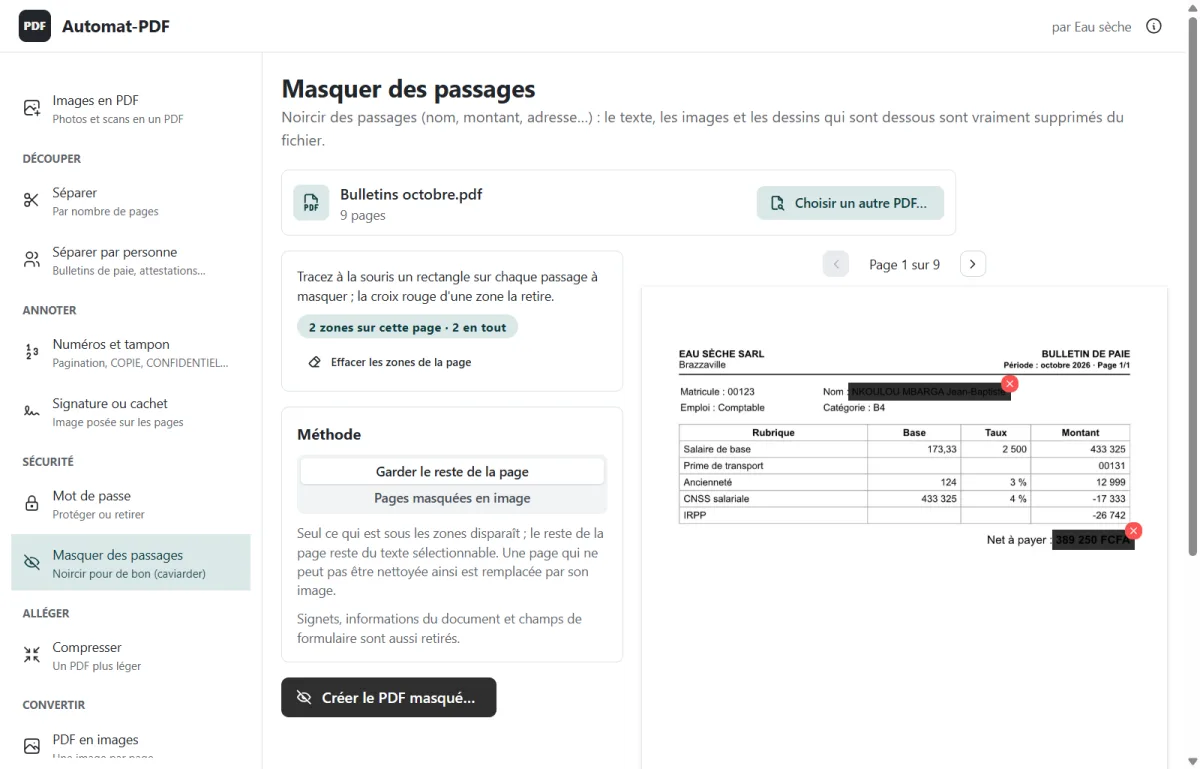
Masquer des passages blacks out the areas you draw and removes from the file the text, images and drawings underneath.
Step by step
-
Drop the PDF on Masquer des passages.
-
With the mouse, draw a rectangle over each passage to redact, page by page.
-
Choose the method (“Garder le reste de la page”, keep the rest of the page, or “Pages masquées en image”, redacted pages as images, the safest), then Créer le PDF masqué… (Create the redacted PDF…).
Good to know
- Bookmarks, document information and form fields are removed too.
Screenshots of version 0.2.0, taken in the real application (in French); the names, amounts and addresses they show are fictitious.

Automat-PDF does this on your computer
Free, no subscription, no advertising, no Internet needed. Windows 10 and 11.
Other Automat-PDF tools
- Send each employee their own payslip by email Tool: Séparer par personne (Split by person)
- Compress a PDF for WhatsApp or email Tool: Compresser (Compress)
- Merge several PDFs into one Tool: Fusionner (Merge)
- Reorder, rotate or delete PDF pages Tool: Organiser (Organise)
- Combine the fronts and backs of a scan into one PDF Tool: Rectos et versos (Fronts and backs)
- Turn photos into a single PDF Tool: Images en PDF (Images to PDF)
- Sign or stamp a PDF without printing it Tool: Signature ou cachet (Signature or stamp)
- Number PDF pages and stamp them COPY Tool: Numéros et tampon (Numbers and stamp)
- Password-protect a PDF Tool: Mot de passe (Password)
- Convert Word, Excel or PowerPoint to PDF Tool: Office en PDF (Office to PDF)
- Convert a PDF to an editable Word document Tool: PDF en Word (PDF to Word)
- Print a PDF with 2 or 4 pages per sheet Tool: Pages par feuille (Pages per sheet)
- Split a PDF into several files Tool: Séparer (Split)
- Convert PDF pages to PNG or JPG images Tool: PDF en images (PDF to images)
Do you know someone this software would help?
Send them the link: Automat-PDF is free, and all they need is Windows 10 or 11.
A question about Automat-PDF?
Email us, call us or message us on WhatsApp: we will answer you.