

An Automat-PDF tool
Check the signature of a signed PDF you received
« I received a signed PDF: is the signature valid? »
When it opens, a banner says who signed it, when, and whether the document has changed since.
Windows 10 and 11 · 5.3 MB · no administrator rights
macOS 11 or later · 13 MB · Intel and Apple silicon Macs
Windows will show a warning: this is expected. When you open the file, click More info, then Run anyway (the installer is not digitally signed yet). See it in pictures
macOS will show a warning: this is expected. At first launch, click Done, then, in System Settings › Privacy & Security, click Open Anyway (the application is not notarised by Apple yet). See it in pictures


The situation
A contract signed online, a certificate or an official document arrives digitally signed. Nothing on the page shows who really signed it, or whether it has been changed since.
The solution
Since version 0.7.0, the reader checks digital signatures when a PDF opens. A banner says who signed, when, and what the signature is worth: in green, it is valid; in orange, it needs a closer look; in red, it is not valid.
Step by step
-
Open the signed PDF in the reader: the banner appears at the top (“Signé par … le …”, Signed by … on …).
-
Click Détails (Details). For each signature, the panel says whether the signed version is intact and what has changed since, whether the signer's identity is confirmed by Windows or macOS, and whether the date is guaranteed by a timestamp. It also gives the reason, the place and the certificate.
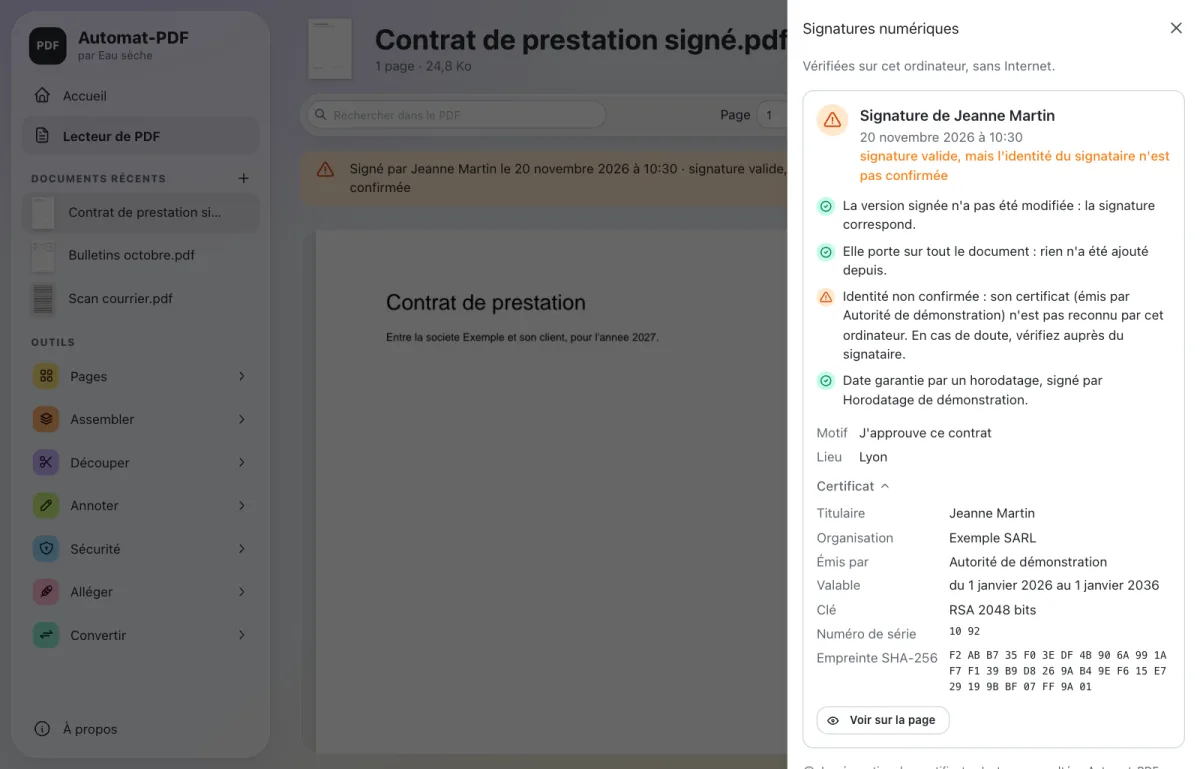
-
If the document was changed after it was signed, Voir la version signée (View the signed version) opens it, in a new tab, as it was when it was signed.
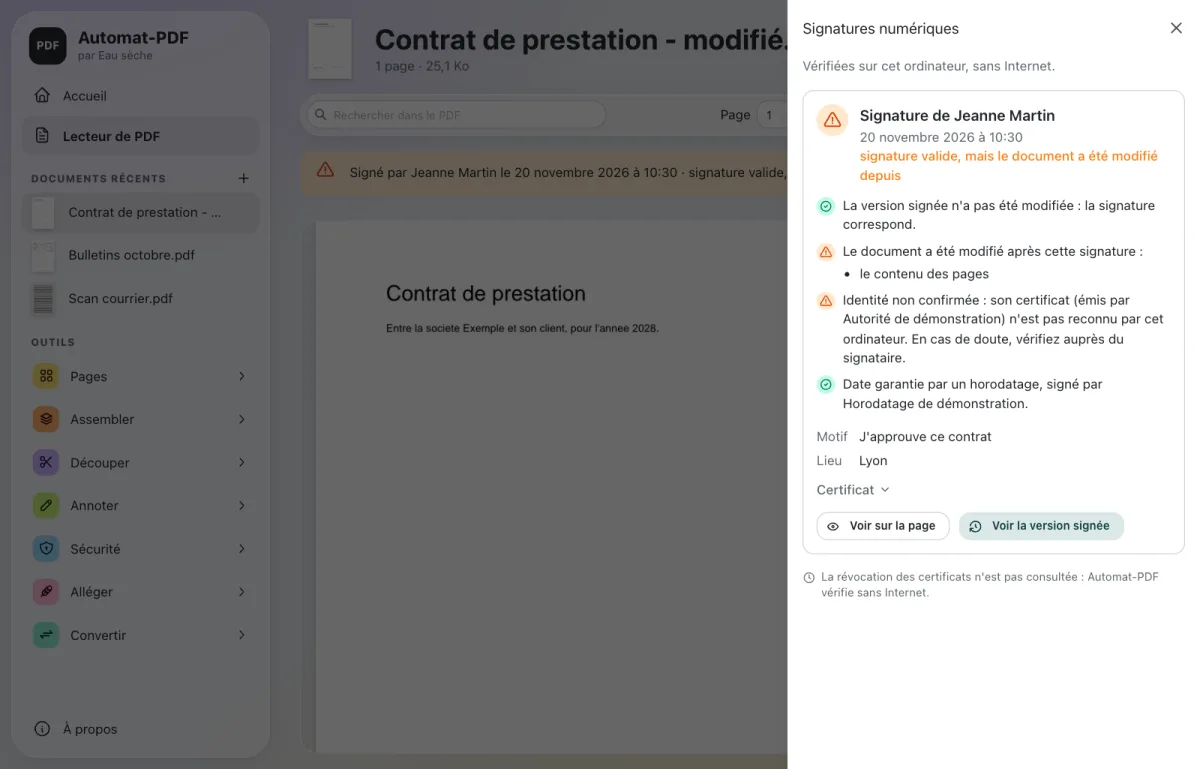
The result. On a test contract signed by a demonstration authority, the banner says “signature valide, mais l'identité du signataire n'est pas confirmée” (valid signature, but the signer's identity is not confirmed). On the same contract, changed after it was signed (the year 2027 turned into 2028, in an added revision), it says “le document a été modifié depuis” (the document has been changed since); the signed version shows 2027.
Good to know
- The check is done on the computer, without the Internet: no certificate is downloaded, and certificate revocation is not checked.
- “Identité non confirmée” (identity not confirmed) does not mean that the signature is false: its certificate does not lead back to an authority known to Windows or macOS. If in doubt, check with the signer.
- A signed PDF that you annotate, fill in or sign by hand stays valid: Automat-PDF adds your changes after the signed version, without changing it.
- Automat-PDF checks digital signatures; it does not create them. The drawn signature is the image of a signature, as with a pen.
Screenshots of version 0.7.0: the application's screens (in French), with the results it gives on test files. The names, amounts and addresses they show are fictitious.

Automat-PDF does this on your computer
Free, no subscription, no advertising, no Internet needed. Windows 10 and 11, macOS 11 or later.
Other Automat-PDF tools
- Send each employee their own payslip by email Tool: Séparer par personne (Split by person)
- Read a PDF and search it for a word Tool: Lecteur de PDF (PDF reader)
- Print a PDF in colour or in black and white Tool: Imprimer (Print)
- Comment on a PDF: underline, strike out, stamp Tool: Commentaires (Comments)
- Correct a word or an amount in a PDF Tool: Éditeur de PDF (PDF editor)
- Fill in a PDF form without printing it Tool: Formulaires (Forms)
- Compress a PDF for WhatsApp or email Tool: Compresser (Compress)
- Merge several PDFs into one Tool: Fusionner (Merge)
- Reorder, rotate or delete PDF pages Tool: Organiser (Organise)
- Combine the fronts and backs of a scan into one PDF Tool: Rectos et versos (Fronts and backs)
- Turn photos into a single PDF Tool: Images en PDF (Images to PDF)
- Sign or stamp a PDF without printing it Tool: Signature ou cachet (Signature or stamp)
- Number PDF pages and stamp them COPY Tool: Numéros et tampon (Numbers and stamp)
- Redact information in a PDF Tool: Masquer des passages (Redact passages)
- Password-protect a PDF Tool: Mot de passe (Password)
- Convert Word, Excel or PowerPoint to PDF Tool: Office en PDF (Office to PDF)
- Convert a PDF to an editable Word document Tool: PDF en Word (PDF to Word)
- Print a PDF with 2 or 4 pages per sheet Tool: Pages par feuille (Pages per sheet)
- Split a PDF into several files Tool: Séparer (Split)
- Convert PDF pages to PNG or JPG images Tool: PDF en images (PDF to images)
Do you know someone this software would help?
Send them the link: Automat-PDF is free, for Windows 10 and 11 and for Mac (macOS 11 or later).
A question about Automat-PDF?
Email us, call us or message us on WhatsApp: we will answer you.