

An Automat-PDF tool
Crop a PDF and remove its margins
« I need to remove the margins of a PDF, or keep only part of it »
One frame for all pages, or each page fitted to its content.
Windows 10 and 11 · 5.6 MB · no administrator rights
macOS 11 or later · 14 MB · Intel and Apple silicon Macs
Windows will show a warning: this is expected. When you open the file, click More info, then Run anyway (the installer is not digitally signed yet). See it in pictures
macOS will show a warning: this is expected. At first launch, click Done, then, in System Settings › Privacy & Security, click Open Anyway (the application is not notarised by Apple yet). See it in pictures


The situation
Wide white margins that make everything small on screen, black borders left by the scanner, or only the top of each page that matters.
The solution
Since version 0.9.0, Recadrer les pages (Crop pages) keeps the frame you draw on a page, or the one Automat-PDF fits to its content, for all the chosen pages. Or each page loses its white margins, according to what it holds. What lies outside the frame is removed from the file.
Step by step
-
Open Recadrer les pages (Crop pages), in Pages, and drop the PDF on it.
-
Draw the frame to keep on the page, or click Ajuster au contenu (Fit to content); the arrows show the same frame on the other pages. Or choose Chaque page à son contenu (Each page to its content).
-
Choose Toutes les pages (All pages) or Certaines pages (Some pages), then click Recadrer… (Crop…).
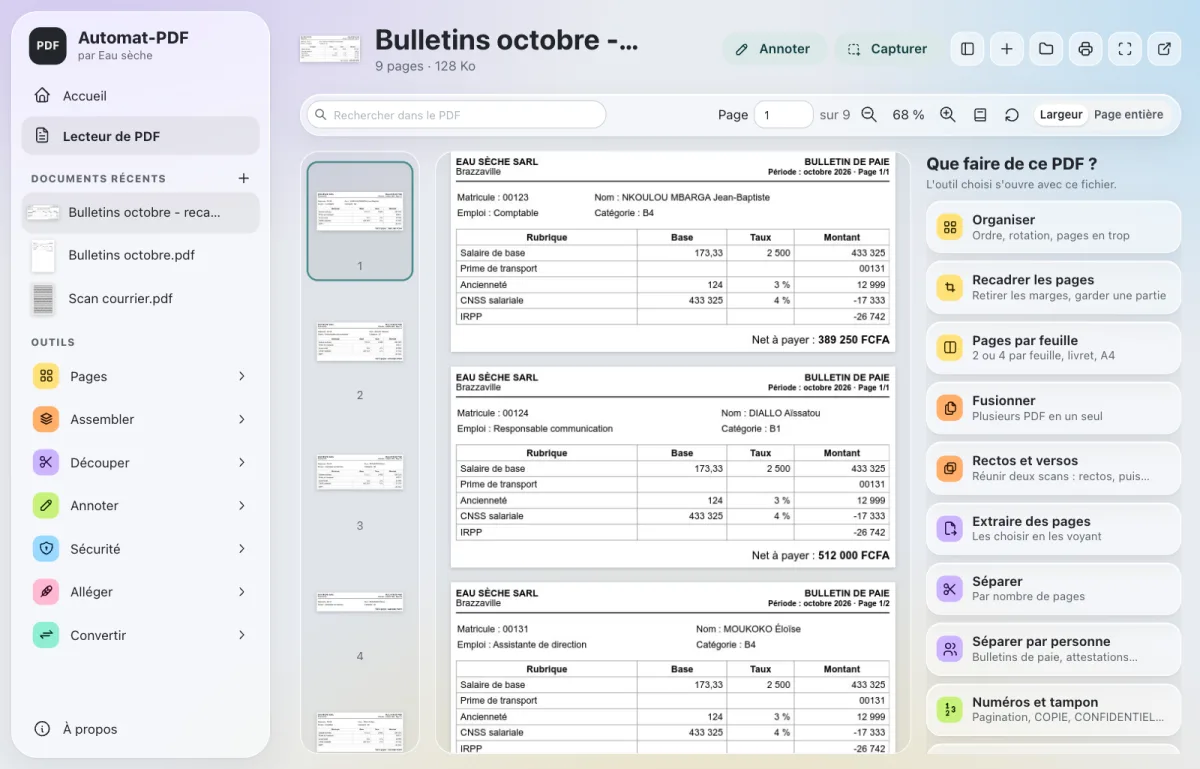
The result. The 9 pages of the test payslips lose their wide white margins: each payslip fills the whole width of the screen.
Good to know
- The original PDF is not modified; bookmarks and links are kept.
- With Chaque page à son contenu (Each page to its content), a fuller page is not cut, and a blank page stays as it is.
- For just one part of a page, to copy or save separately: see “I want to keep a photo or a passage from a PDF” (Capturer, Capture).
Screenshots of version 0.9.0: the application's screens (in French), with the results it gives on test files. The names, amounts and addresses they show are fictitious.

Automat-PDF does this on your computer
Free, no subscription, no advertising, no Internet needed. Windows 10 and 11, macOS 11 or later.
Other Automat-PDF tools
- Send each employee their own payslip by email Tool: Séparer par personne (Split by person)
- Read a PDF and search it for a word Tool: Lecteur de PDF (PDF reader)
- Capture part of a PDF page as an image Tool: Capturer (Capture)
- Make a scanned PDF searchable (OCR) Tool: Reconnaître le texte (Recognise text)
- Scan paper documents to PDF Tool: Numériser (Scan)
- Print a PDF in colour or in black and white Tool: Imprimer (Print)
- Comment on a PDF: underline, strike out, stamp Tool: Commentaires (Comments)
- Correct a word or an amount in a PDF Tool: Éditeur de PDF (PDF editor)
- Fill in a PDF form without printing it Tool: Formulaires (Forms)
- Check the signature of a signed PDF you received Tool: Signatures numériques (Digital signatures)
- Compress a PDF for WhatsApp or email Tool: Compresser (Compress)
- Merge several PDFs into one Tool: Fusionner (Merge)
- Reorder, rotate or delete PDF pages Tool: Organiser (Organise)
- Extract one or more pages from a PDF Tool: Extraire des pages (Extract pages)
- Combine the fronts and backs of a scan into one PDF Tool: Rectos et versos (Fronts and backs)
- Turn photos into a single PDF Tool: Images en PDF (Images to PDF)
- Sign or stamp a PDF without printing it Tool: Signature ou cachet (Signature or stamp)
- Number PDF pages and stamp them COPY Tool: Numéros et tampon (Numbers and stamp)
- Redact information in a PDF Tool: Masquer des passages (Redact passages)
- Password-protect a PDF Tool: Mot de passe (Password)
- Convert Word, Excel or PowerPoint to PDF Tool: Office en PDF (Office to PDF)
- Convert a PDF to an editable Word document Tool: PDF en Word (PDF to Word)
- Save the text of a PDF as a text file Tool: PDF en texte (PDF to text)
- Print a PDF with 2 or 4 pages per sheet Tool: Pages par feuille (Pages per sheet)
- Split a PDF into several files Tool: Séparer (Split)
- Convert PDF pages to PNG or JPG images Tool: PDF en images (PDF to images)
- Extract the images of a PDF Tool: Extraire les images (Extract images)
Do you know someone this software would help?
Send them the link: Automat-PDF is free, for Windows 10 and 11 and for Mac (macOS 11 or later).
A question about Automat-PDF?
Email us, call us or message us on WhatsApp: we will answer you.